Appearance
Influencer Affiliates
Manage the influencer affiliate scheme: link-based attribution, configurable percentage commissions, and site-credit or cash-wallet payouts.
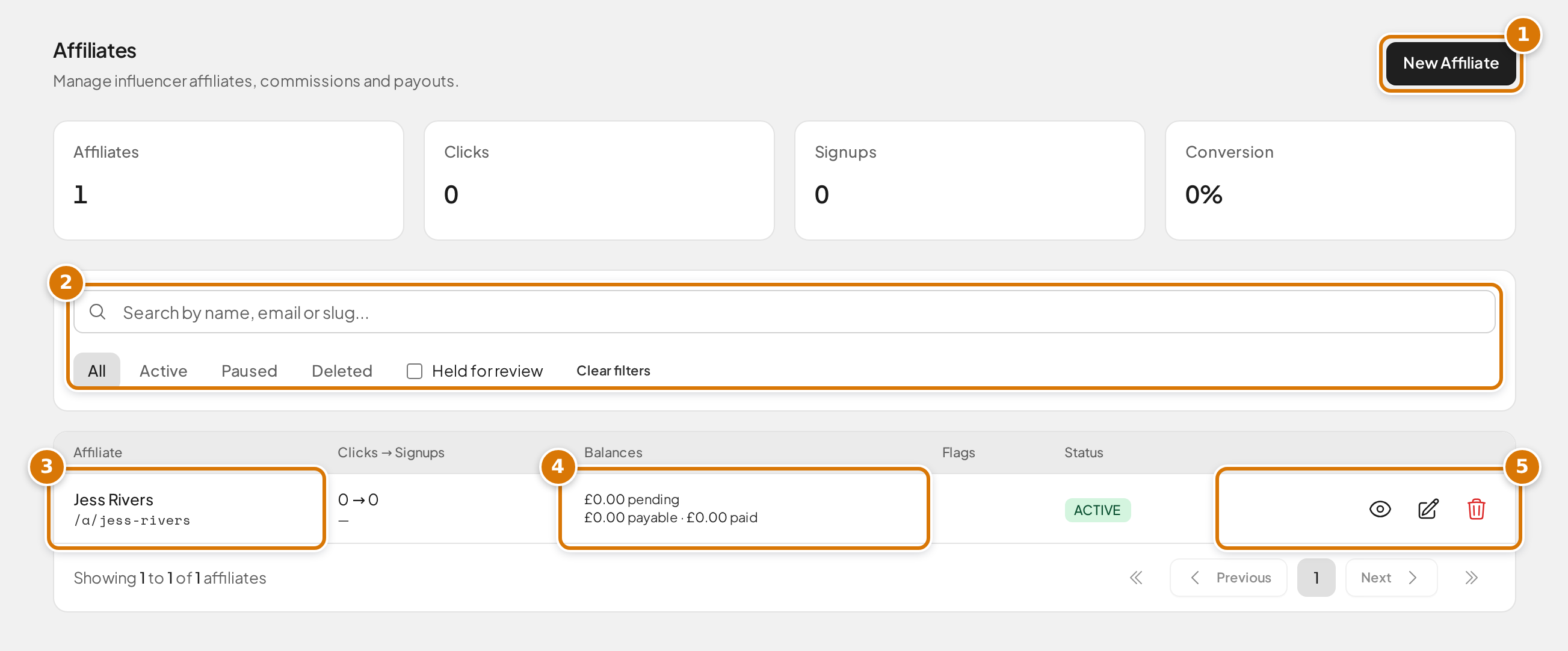
- New Affiliate signs someone up.
- Search by name, email or slug, filter by status, or show only affiliates Held for review.
- Each affiliate's name and the link they share.
- Balances: commission still maturing (pending), ready to pay (payable) and already paid.
- View, edit or delete an affiliate.
Route
Marketing → Affiliates (/admin/affiliates)
Overview
The affiliate scheme lets you pay influencers a configurable percentage of the spend of the players they bring in, for a configurable time, as either site credit or withdrawable cash-wallet balance. It sits alongside — but is separate from — the referral programme.
Referrals vs Affiliates: referrals are a one-off, fixed reward between two customers. Affiliates are an ongoing percentage commission paid to an influencer on the spend of the players who sign up through their link.
How it works
- An affiliate is given a unique link (
/a/<slug>) — and their slug doubles as a creator code they can say out loud ("use code big-mike when you sign up"). - When a visitor clicks the link, a first-party cookie records the click (gated behind cookie consent).
- If that visitor signs up, the affiliate is permanently attributed to them. Affiliate attribution wins over any referral code the new user enters. A visitor without the cookie can instead type the creator code into the registration form's Referral or creator code field (it prefills automatically when they arrive through the link without cookie consent) — a typed creator code even overrides the cookie, so the affiliate a customer names always wins.
- Every eligible order that attributed user places within the affiliate's earning window creates a commission — a percentage of the order value. By default the window restarts each time the customer comes back through the link (a fresh click, or a click followed by logging in), so an affiliate who keeps promoting keeps earning. Orders placed before the customer was attributed never earn.
- Commissions mature after a hold window, then pay out automatically as site credit, or settle to the cash wallet for withdrawal.
Creator codes are also the compliance-friendly fallback: they involve no cookie at all, so they work for visitors who decline the consent banner (see Compliance notes). Attributions from a typed code show alongside link attributions in the funnel; each one still records a click entry (marked from the sign-up itself) so the fraud tooling treats both channels the same.
By default, attribution applies to new sign-ups only, and existing customers are never retroactively attributed. You can widen this per affiliate with Can earn from; see Existing customers.
A customer no longer needs to be logged in when they click. If they click the link logged out and then log in — logging in is required to buy — the visit is credited at login: it attributes them (where the affiliate can earn from existing customers) or restarts their earning window if they already belong to that affiliate. Consent still gates this: the cookie is only set, and only read at login, with marketing consent.
Existing customers
Can earn from decides who an affiliate may be credited for. It has a site-wide default (Settings → Affiliates) and a per-affiliate override.
- New customers only (the default) means an affiliate earns only from people who did not already have an account. When an existing customer clicks the link, the click is still counted for the affiliate, but nothing is attributed and no commission is ever earned.
- New and existing customers also binds players who already had an account, at the moment they click the link.
Allowing existing customers is a commercial decision, not just a setting. Those players were already spending with you, so anything they buy now pays out commission on revenue you already had. The usual abuse is an affiliate promoting their link to your own audience, such as your mailing list or a group full of your existing players, and collecting a percentage of spend that was going to happen anyway. Three things contain it:
- Existing customer window. These players stop earning commission after a short window (7 days by default) rather than the full earning window. Keep it short.
- First click wins. A player who is already attributed to one affiliate can never be taken by another. A repeat visit through the same affiliate's link only restarts the earning window (when re-click refresh is on) — it never changes who the customer belongs to.
- No backdating. Binding an existing customer never pays commission on orders they placed before the moment they were attributed.
- The Customer column. Every row in an affiliate's commission ledger is marked New or Existing, so you can see at a glance whether an affiliate is bringing you players or billing you for the ones you had. Nothing is blocked automatically; the flag is there so you can decide.
An affiliate can never be attributed to themselves through their own link.
Creating an affiliate
Affiliates must be existing platform users (this is a hard requirement — payouts run on the user's wallet).
- Click New Affiliate — a side panel slides in.
- Search for the user by name or email in the typeahead.
- If the user already has a live affiliate record, an inline error blocks the creation.
- Configure the affiliate (fields default from your site settings — see the config matrix). The slug field shows the full link the affiliate will share.
- Click Create Affiliate. The panel closes and opens the new affiliate's profile. They accept the affiliate terms on their first dashboard visit.
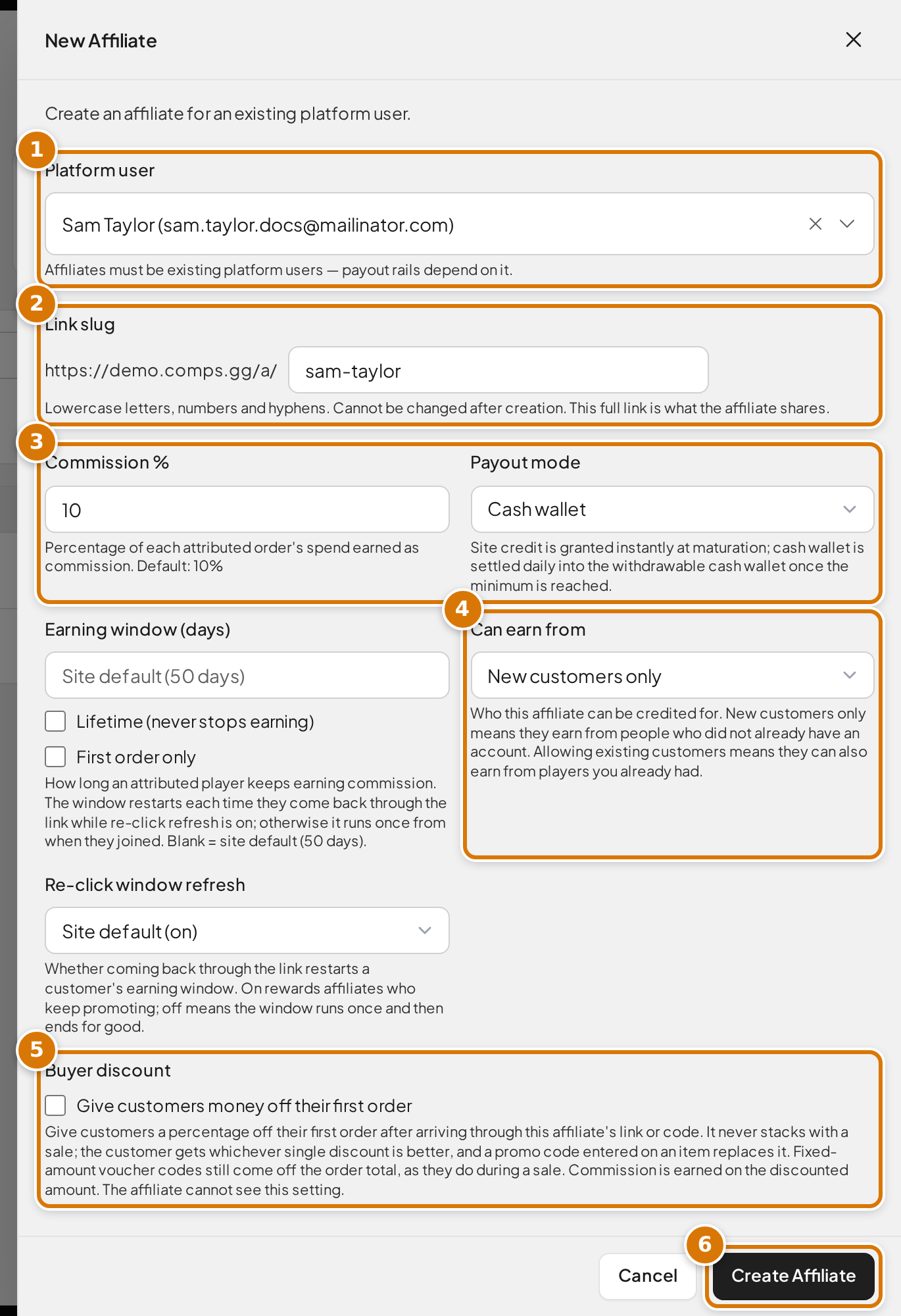
- Platform user: the customer account the affiliate is paid through.
- Link slug makes up the link they share. It can't be changed later.
- Commission % and Payout mode (site credit or cash wallet).
- Can earn from: new customers only, or existing customers too.
- Buyer discount optionally gives their customers money off a first order.
- Create Affiliate saves it.
The affiliate's profile page shows who they are (name and email) and their full shareable link, with a copy button — copy it from there when you need to send it to them.
Deleting and restoring
Deleting an affiliate hides them from the default list; their balance and payout history are preserved, and any pending commissions still mature and pay. To bring a deleted affiliate back, simply create an affiliate for the same user again: their original profile is restored with the new slug and settings you enter, and their history and balances carry over.
Configuration matrix
Every knob has a site-wide default (Settings → Affiliates) and, for the money-affecting ones, a per-affiliate override. Config changes never restate existing commissions — rows keep the rate and window they were created with — though widening a window or turning on re-click refresh does re-open future earning for already-attributed customers.
| Knob | Site default | Per-affiliate override |
|---|---|---|
| Feature on/off | Enable affiliate scheme | Per-affiliate status (pause) |
| Commission % | Default commission % | Yes |
| Earning window (days; blank = lifetime) | Default earning window | Yes |
| First order only (earn on each customer's first order) | — | Per-affiliate only |
| Buyer discount (money off the customer's first order) | — | Per-affiliate only (toggle + %) |
| Can earn from (new / new and existing customers) | Affiliates can earn from | Yes |
| Re-click window refresh (repeat visits restart the window) | Re-click window refresh (on by default) | Yes (Site default / On / Off) |
| Existing customer window (days; blank = lifetime) | Existing customer window | Yes |
| Payout mode (site credit / cash wallet) | Default payout mode | Yes |
| Maturation window (days; 0 = payable within the hour) | Maturation days | — |
| Attribution cookie window (days) | Cookie window | — |
| Minimum cash settlement | Cash payout minimum | — |
| Payouts frozen (emergency stop) | Emergency Controls | — |
| Exclude a competition from commission | — | On the competition form |
Re-click window refresh
By default a customer's earning window restarts whenever they come back through their affiliate's link — a fresh click while logged in, or a click followed by logging in. The window then means "days since the affiliate last sent them", which rewards affiliates who keep promoting. Turn it off (site-wide, or per affiliate) and each window runs once from when the customer was first attributed, then ends for good. Turning it off is the right choice for deals priced as a one-off introduction fee; the default suits ongoing partnerships. A refresh only ever extends earning forward: orders from a lapsed period before the customer came back stay unpaid.
First order only
Ticking First order only limits an affiliate to earning commission on each customer's first order; anything that customer buys later earns nothing. The earning window still applies to that first order — it decides how long the customer has to place it (and a re-click refresh gives them longer). Use this for one-off introduction deals; leave it off for ongoing partnerships.
Buyer discount
Turning on Buyer discount gives customers a percentage off their first order placed after arriving through the affiliate's link or code. This is the two-sided deal many influencers ask for: their audience gets money off, and the affiliate earns commission.
Worth knowing before you set the numbers:
- It never stacks with other price cuts. If a sale, early bird price or bulk discount would save the customer more, they get that instead — always the single best discount on each item. A promo code entered on an item replaces the buyer discount. Fixed-amount voucher codes still come off the order total afterwards, exactly as they do during a sale.
- Commission is earned on the discounted amount. With a 20% buyer discount and 20% commission, a £10 order charges £8 and earns the affiliate £1.60, not £2. Price your deals with that in mind.
- First order means first order. Later orders from the same customer are charged at normal prices, whatever the earning settings say.
- The affiliate cannot see this setting. Their dashboard shows earnings only; the deal terms are yours to communicate.
At checkout the customer sees the saving as a Creator discount line.
Commission lifecycle
Commissions move through an append-only lifecycle:
- Pending — created when an attributed order completes; waiting to mature. With the default maturation window of 0 days, this lasts until the next hourly run.
- Payable — the maturation window has passed; ready to pay.
- Paid — granted as site credit (credit mode) or settled into the cash wallet (cash-wallet mode). Terminal.
- Reversed — fully reversed by a refund or a manual admin action. Terminal.
Credit-mode commissions grant wallet credit automatically the moment they mature (hourly). Cash-wallet commissions settle once daily, and only when the net payable balance reaches the cash minimum — below that, earnings roll over to the next run.
Payout modes
- Site credit — matured commissions are added to the affiliate's site credit automatically. Money stays in the ecosystem.
- Cash wallet — matured commissions are settled into the affiliate's withdrawable cash wallet (no money leaves the platform at settlement) and are withdrawn through the standard admin-approved withdrawal flow, subject to the cash minimum.
DAC7 gate (cash-wallet mode)
Paying affiliates withdrawable cash plausibly triggers HMRC DAC7 platform-reporting obligations. Before enabling cash-wallet payout mode for a client for the first time, confirm the DAC7 position and record the decision. Credit-only mode needs no DAC7 gate.
Refunds and reversals
- A refund on a commissioned order automatically reverses the commission — fully, or proportionally for a partial refund — while the commission is still Pending or Payable.
- Commissions that have already been paid are never recovered. The maturation window, the held-for-review control, and the admin-approved withdrawal flow are the protections against paying out a bad commission; if an affiliate turns out to be a bad actor, the recommended response is to pause them.
- Chargebacks have no webhook, so use the manual reverse action (finance permission) to reverse an unpaid commission discovered in the payment gateway portal.
- Order cancellations that issue a refund reverse automatically; cancellations without a refund row must be reversed manually.
Fraud controls
The list and stats surface several signals — all are soft signals (clicks are bot-inflatable), meant to prompt a look, not to auto-decide:
- Held for review — a commission auto-held for an admin decision. The maturation job skips held rows until an admin releases them.
- Conversion anomaly — a near-100% click-to-signup conversion, which can indicate manufactured clicks.
- Shared IP — a sign-up sharing the affiliate's own registration IP is flagged (possible self-referral) and auto-holds the commission.
- Existing customer — a commission earned from a player who already had an account before they were attributed. Shown in the Customer column of the affiliate's ledger. Only possible for affiliates set to earn from existing customers.
Self-purchases (an affiliate buying through their own link) never earn commission. Commission is earned on card spend only — the portion of an order funded by wallet credit earns nothing, so credit-recycling loops (including the old token-card-charge trick) are structurally worthless.
Emergency controls
Settings → Affiliates has an Emergency Controls section with a Freeze all affiliate payouts switch. When frozen, neither maturation nor settlement moves any money, and a persistent banner appears on the Affiliates list. Flipping the switch in either direction asks for confirmation and is audit-logged — it is the single control that stops money leaving during a fraud incident.
Role matrix
Affiliate access is gated by typed permissions. Marketing must never see customer financials.
| Capability | ADMIN | MARKETING | SHOP_MANAGER |
|---|---|---|---|
View affiliate list, funnel stats, coarse totals (affiliates.read) | ✅ | ✅ | ❌ |
| View per-order commission ledger + attribution lists | ✅ | ❌ | ❌ |
Create / edit profile, slug, status (affiliates.manage) | ✅ | ❌ | ❌ |
Change rate / payout mode / windows; hold / release / reverse (affiliates.finance) | ✅ | ❌ | ❌ |
MARKETING gets read only — profile, funnel stats, and coarse lifetime totals. Per-order amounts, attribution lists, and every financial action are withheld. SHOP_MANAGER gets no affiliate access at all: they already hold wallet permissions, and affiliate read would let them cross-reference an affiliate to a customer's wallet history.
Financial-config changes are treated as money movement (a rate change to 90% moves more money than any single reverse), so they sit behind affiliates.finance — not manage.
Compliance notes
- ASA / #ad — affiliates promote a licensed prize competition and must clearly disclose the commercial relationship (for example, with #ad). The affiliate T&Cs, accepted on first dashboard access, record this obligation.
- PECR (cookies) — the attribution cookie is only set when the visitor has accepted cookies via the consent banner, so it can only ever exist with consent. At login the consent state is additionally re-checked before the cookie is read — withdraw consent after clicking and a later login ignores the cookie. Visitors who decline are simply not attributed; the loss is measurable (clicks recorded vs cookies set). No attribution is ever recorded without consent. The site's cookie policy page lists the attribution cookie whenever affiliates are enabled.
- The banner appears whenever affiliates are on — even with no advertising pixels configured, enabling the affiliate scheme makes the consent banner show, because consent is the only way attribution can happen.
- First visits are recovered at Accept — a brand-new visitor arriving through an affiliate link has not answered the banner yet, so nothing is tracked on landing. The link's code is kept in page memory only (nothing is stored on their device), and if they press Accept the click is recorded at that moment. If they decline, or leave without deciding, the visit is never tracked.
- Creator codes need no consent at all — a code typed into (or prefilled in) the registration form travels with the form itself; nothing is stored on the visitor's device, so the cookie rules aren't engaged. This is how a visitor who declines the banner can still be attributed — by explicitly naming the affiliate at sign-up.
- Visitors are told about the code — when someone arrives on an affiliate link, the consent banner names the offer and both ways to claim it: accept cookies and the discount applies automatically, or type the creator code at sign-up. If they decline, a small notice repeats the code, and the registration form confirms the code once it prefills. Both routes are always shown together and the Accept and Reject buttons stay equally prominent, deliberately: a discount that only survives accepting would make refusal cost the visitor something, and consent given to avoid a penalty is not valid consent. It stays lawful precisely because the typed code grants the identical discount with nothing stored on the device.
- Cookie topology — attribution relies on an apex-domain cookie, which requires a client to be on a custom domain. Auto-generated Railway
*.up.railway.appdomains cannot carry it, so attribution is unavailable there until a custom domain is attached (expected, not a fault). - GDPR — attribution and click data carrying personal data (IP addresses) is anonymised, not deleted, when a user is erased, so the money ledger stays intact. Click rows are pruned on an age-based retention schedule.
The influencer's view
Affiliates see a self-service dashboard at /account/affiliate:
- Their link, with a copy button.
- Stats: clicks, sign-ups, conversion.
- Balances: pending, payable, paid.
- A commission ledger with no customer identity, order contents, or dates more precise than the day. Held rows show simply as "Under review".
- Cash-wallet affiliates below the minimum see a rollover progress bar.
- Payout history: credit grants and cash-wallet payouts.
On first access, a blocking terms-and-conditions modal records the affiliate's acceptance before the dashboard renders.
Best practices
- Tell affiliates to say their code out loud, not just share the link. Every visitor who declines the cookie banner is invisible to the link, and rejection rates run high — the code is the only channel that reaches that audience, and it works whether they hear it in a video, read it in a caption, or see it on the banner when they land.
- Review held-for-review affiliates regularly.
- The maturation window defaults to 0 days (payable within the hour). Once a commission is paid it can never be recovered — the maturation window is the only period in which a refund or chargeback can still reverse a commission. Refunds are near-nonexistent in this industry so 0 is the accepted default, but if a client is worried about chargebacks on cash-wallet payouts, raise the site-wide window (e.g. 30 days).
- Use the per-competition exclusion flag for competitions you don't want to pay commission on.
- Confirm the DAC7 position before turning on cash-wallet mode for a new client.
- Freeze payouts immediately if you suspect a live fraud incident, then investigate.